Introduction
Laptops and MacBooks have become an essential part of modern life. From office work and online learning to business operations, creative design, and entertainment, we rely heavily on these devices every single day. As this dependence grows, even a small technical issue—such as overheating, battery failure, or slow performance—can cause serious disruption, lost productivity, and unnecessary stress.
Many users tend to ignore early warning signs like unusual fan noise, slower performance, or random shutdowns, hoping the problem will resolve itself. Unfortunately, this approach often leads to more severe damage, higher repair costs, or even complete device failure.
Understanding the most common laptop and MacBook problems—and knowing when to seek professional repair—can save you time, money, and valuable data. At Get Fix Computers, we specialize in professional laptop and MacBook diagnostics and repairs, ensuring your device is restored safely, efficiently, and reliably.
1. Overheating and Cooling System Failures
Why Overheating Happens
Overheating is one of the most frequent issues we see in laptops and MacBooks. These devices are compact, powerful, and designed to operate within a specific temperature range. When cooling systems fail, heat builds up rapidly.
Common causes of overheating include:
- Dust and debris buildup inside cooling fans
- Blocked or damaged air vents
- Dried, cracked, or poorly applied thermal paste
- Failing or noisy cooling fans
- Using laptops on soft surfaces like beds or sofas
Risks of Ignoring Overheating
When a laptop overheats, it may:
- Slow down due to performance throttling
- Shut down suddenly to protect internal components
- Freeze or crash during important tasks
- Suffer long-term damage to the CPU, GPU, or motherboard
Repeated overheating can significantly shorten your device’s lifespan.
Professional Repair Matters
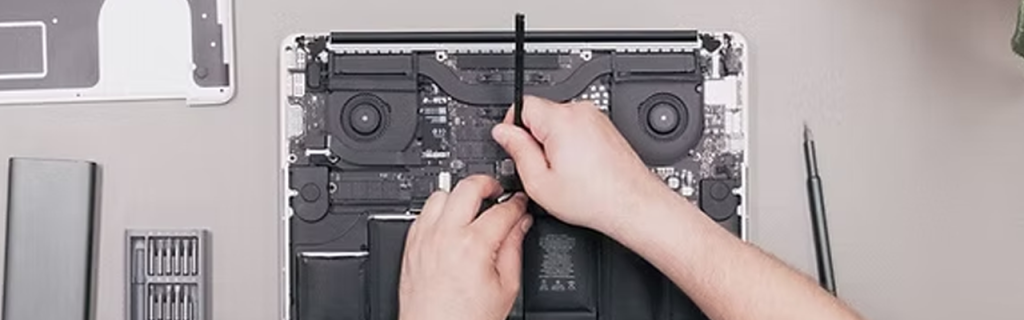
Professional technicians can safely open the device, clean internal components, replace faulty fans, and reapply high-quality thermal paste. At Get Fix Computers, we use proper tools and techniques to restore optimal airflow and cooling, preventing further damage and improving overall performance.
2. Battery and Power Issues
Common Battery Problems
Battery-related issues are inevitable as laptops age, but they can also occur prematurely due to improper charging habits or low-quality accessories. Typical battery and power issues include:
- Rapid battery drain
- Laptop shutting down unexpectedly
- Device not charging or charging intermittently
- Swollen or overheating batteries
- Power ports becoming loose or damaged
MacBooks, in particular, may display battery health warnings that many users ignore until the problem worsens.
Dangers of Faulty Batteries
A failing or swollen battery is not just inconvenient—it can be dangerous. Swollen batteries can damage internal components, warp the laptop casing, or even pose a fire risk.
Why Professional Replacement Is Safer
Using cheap or incompatible replacement batteries can cause further problems. At Get Fix Computers, we replace faulty batteries with high-quality or genuine replacements, ensuring proper compatibility, safety, and long-lasting performance. We also check charging ports, adapters, and power circuits to address the root cause.
3. Slow Performance, Freezing, and Software Issues
What Causes a Slow Laptop?
A slow or unresponsive laptop can be incredibly frustrating, especially when it affects work or studies. Common reasons include:
- Malware, viruses, or spyware
- Corrupted operating systems
- Failing hard drives or SSDs
- Insufficient RAM
- Too many background or startup applications
- Outdated software or drivers
Signs You Need Professional Help
If your laptop takes too long to boot, freezes frequently, crashes unexpectedly, or struggles with basic tasks, the issue may be deeper than simple settings adjustments.
Professional Diagnostics and Optimization
At Get Fix Computers, we perform thorough diagnostics to determine whether the issue is software-related or hardware-based. Our services include:
- Malware and virus removal
- Operating system repair or reinstallation
- SSD or hard drive health checks
- RAM upgrades
- Performance optimization
These professional solutions can dramatically improve speed, stability, and responsiveness—often making your laptop feel like new again.
4. Screen, Keyboard, and Physical Damage
Common Physical Issues
Laptops and MacBooks are portable by design, which makes them vulnerable to accidental damage. Some of the most common physical problems include:
- Cracked, flickering, or black screens
- Lines or dead pixels on the display
- Unresponsive or sticky keyboards
- Faulty trackpads
- Broken hinges
- Damaged USB, HDMI, or charging ports
- Liquid spills causing internal corrosion
- Why DIY Repairs Are Risky
- Many users attempt DIY repairs after watching online tutorials. While this may seem cost-effective, it often leads to:
- Further internal damage
- Broken connectors or cables
- Voided warranties
- Incorrect part installation
Professional Repair Makes the Difference
Professional technicians use specialized tools and genuine parts to ensure safe and accurate repairs. At Get Fix Computers, we carefully repair or replace damaged screens, keyboards, and internal components without compromising the rest of your device.
5. Data Loss and Storage Failures
How Data Loss Happens
Hard drives and SSDs can fail without warning. Data loss can occur due to:
- Failing storage drives
- Power surges
- Liquid damage
- Accidental deletion
- Operating system corruption
Losing important files, photos, or business data can be devastating.
Professional Data Protection
Attempting recovery without proper tools can permanently destroy data. Professional repair services can diagnose storage issues early and perform safe data recovery when possible. At Get Fix Computers, we prioritize data safety during every repair process.
6. Why Professional Laptop and MacBook Repair Is Important
Choosing professional repair services offers several key benefits:
- Accurate Diagnosis: Identifying the real cause, not just symptoms
- Long-Lasting Solutions: Repairs that prevent repeat issues
- Device Safety: Protection of sensitive internal components
- Warranty-Backed Service: Peace of mind and reliability
- Cost Savings: Preventing small issues from becoming major failures
- At Get Fix Computers, we focus on fixing the root cause rather than applying temporary fixes, ensuring your laptop performs reliably for years to come.
Conclusion
Ignoring laptop and MacBook problems may seem harmless at first, but small issues can quickly escalate into expensive repairs or complete device failure. Overheating, battery problems, slow performance, and physical damage all require professional attention to ensure safety, performance, and longevity.
By choosing expert repair services, you protect your investment, safeguard your data, and restore your device’s full functionality. Whether you need diagnostics, repairs, or upgrades, Get Fix Computers is your trusted partner for reliable, professional, and hassle-free laptop and MacBook repair services.